Standardizing the Tool Layer in the Agentic Chain
Prologue
The first Agentic Chain article built a LangGraph team: a planner, parallel specialists, RAG tools, a synthesizer, and a critic. The follow-up, The Secure Code Execution For LLMs, moved code execution off the agent's host machine process and into a gVisor warm-pool sandbox. Both designs still had the same structural weakness at the tool boundary. Web search was an in-process DuckDuckGo wrapper. Code execution was an in-process SandboxClient that spoke Kubernetes CRDs. Those tools existed only inside this one Python package. A second agent — Claude Code on a laptop, another LangGraph service, a future specialist process — could not discover them, could not share the same endpoint, and had to re-implement the same SDK calls.
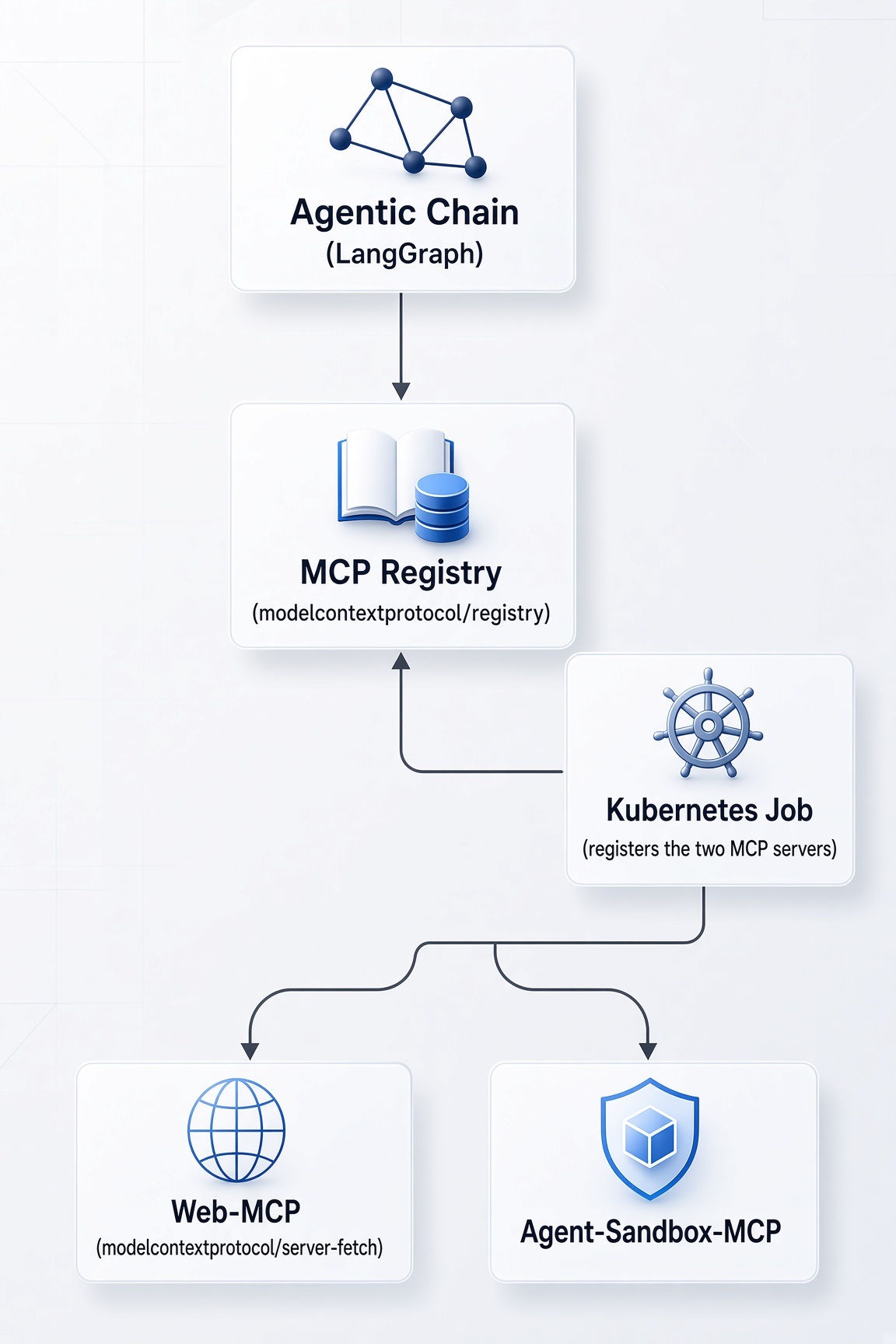
In this part we will talk about the MCP registry and how it can be integrated into our code base. An MCP registry is the catalog: a single HTTP API that publishes which servers exist and where to connect. Once our tools are ordinary MCP servers, any MCP-capable client can find them the same way this LangGraph app does. The agentic spine is unchanged — planner, specialists, aggregator, synthesizer, critic — but specialists no longer import code_interpreter or web_search. They load tools from the live registry on every turn.
The code lives next to this post here. It is a continuation of The Secure Code Execution For LLMs article.
Prerequisites
- Docker Engine (or Docker Desktop / a compatible runtime)
- A
.envfile as explained here
Quick Peek
This section gets the code-base running end to end. Commands assume a Unix-like shell and Docker already available.
- Clone the repository and enter it:
git clone https://github.com/BrutalHex/tech-articles && \
cd tech-articles/docs/posts/2026-08-17-agentic-chain-mcp-registry-and-integrations/code
Create
docs/posts/2026-08-17-agentic-chain-mcp-registry-and-integrations/code/.envwith your provider credentials as explained here.Deploy the full POC (installs tools into
./bin, creates a kind cluster with gVisor mounts, builds and smoke-tests the app and MCP images, loads images into kind, applies kustomize, and waits for readiness):
make deployUseful partial targets if you are iterating: make tools, make setup-kind, make docker-build, make docker-build-fetch-mcp, make docker-build-sandbox-mcp, make load-kind, make apply, make wait-ready, make logs, and make clean-all to tear the kind cluster down. Run bare make or make help for the full list.
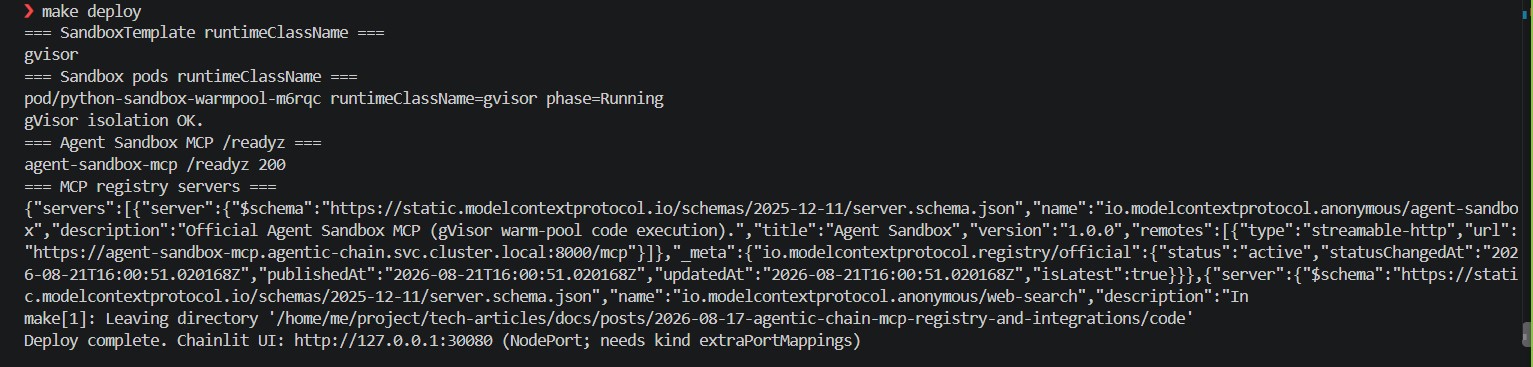
Open the Chainlit UI at http://127.0.0.1:30080.
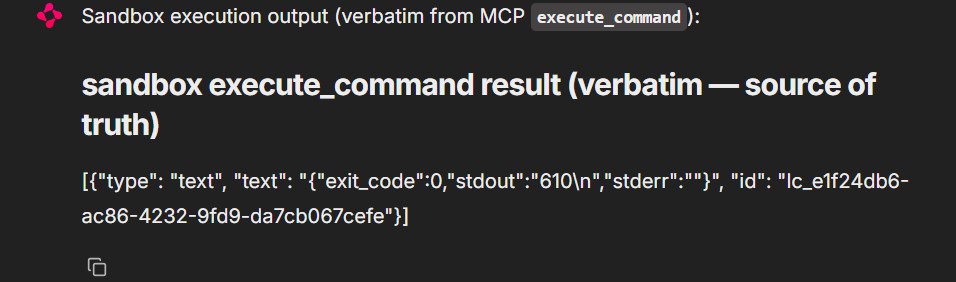
In the chat, try a prompt that must go through the sandbox MCP, for example:
Write and run a recursive Python function that computes the Fibonacci number for n = 15, run the code too and share the output.
After executing the command, you should see an output that includes "stdout": "610", which is the Fibonacci number for 15.
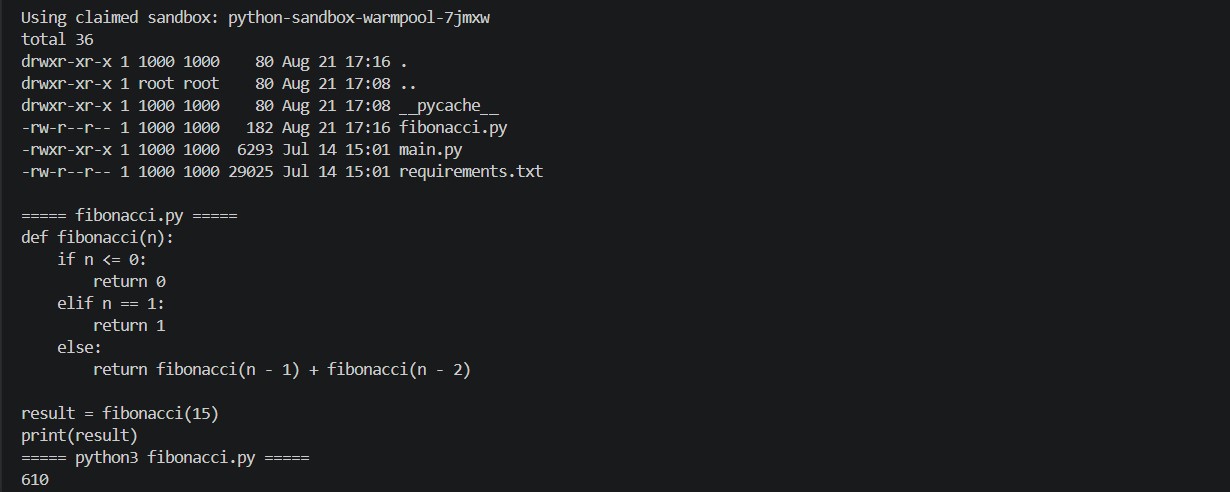
Then inspect the claimed sandbox while the claim is still alive (SANDBOX_SHUTDOWN_AFTER_SECONDS=180). A sandbox MCP claim adopts a warm replica and the pool immediately starts a replacement; get pods -l app=python-runtime-sandbox often returns that unused spare. The uploaded Fibonacci script is on the claimed pod. From this post’s code/ directory:
POD=$(./bin/kubectl -n agentic-chain get sandboxclaim \
  -o jsonpath='{.items[0].status.sandbox.name}') && \
echo "Using claimed sandbox: $POD" && \
./bin/kubectl -n agentic-chain exec "$POD" -c python-runtime -- sh -c '
  ls -la /app
  echo
  for f in /app/*.py; do
    [ "$(basename "$f")" = "main.py" ] && continue
    echo "===== $(basename "$f") ====="
    cat "$f"
    echo
    echo "===== python3 $(basename "$f") ====="
    python3 "$f"
    echo
  done
'
You should see the uploaded .py (often fibonacci.py or script.py) and a printed 610. If sandboxclaim is empty, the 180-second TTL already deleted the claimed replica — re-run the chat prompt and inspect immediately.
Then try a prompt that must go through the Fetch MCP, for example:
Get https://www.dw.com/en and quote the top headline. Fetch today's date.

After the chat returns, show the fetch MCP pod GETting the page (from this post’s code/ directory):
./bin/kubectl -n agentic-chain logs deploy/mcp-fetch -c mcp \
  | grep -E 'CallToolRequest|HTTP Request: GET https?://'
CallToolRequest is the MCP tool call. HTTP Request: GET https://www.dw.com/en … 200 is the pod hitting the public web. App logs only show POST http://mcp-fetch:8000/mcp and do not include that outbound GET.
- Confirm the registry actually published both servers. From the same
code/directory:
./bin/kubectl -n agentic-chain port-forward svc/mcp-registry 8080:8080In another shell:
./bin/curl -sS 'http://127.0.0.1:8080/v0.1/servers?version=latest' | jqYou should see io.modelcontextprotocol.anonymous/fetch and io.modelcontextprotocol.anonymous/agent-sandbox, each with a remotes URL. The mcp-register Job is what put them there; it completes and is later garbage-collected (ttlSecondsAfterFinished: 120).
Why a Shared MCP Registry
An MCP server is a process that speaks the protocol: it advertises tools, accepts calls, returns results. That is already a better contract than a Python function imported into one agent. It is not enough by itself. Without a catalog, every client still hard-codes URLs, transports, and names. Add a second server, or move a Service, or spin up a second agent, and every client changes in lockstep.
A registry turns that into discovery:
- A server publishes a
server.json(name, version, remotes). - Clients list
/v0.1/servers(or the equivalent API on a cloud registry). - Each client connects to the advertised remote and runs MCP
tools/list/tools/call.
The important split is catalog versus session. The registry answers “what exists, and where?”. The MCP session answers “what can this server do right now?”. Tool schemas, default arguments, and live health are session data. Mixing them into the catalog is how you accidentally publish cluster internals as if they were protocol identity.
A shared registry helps in three concrete ways:
- One broadcast, many consumers. The LangGraph specialists, a Claude CLI session, and a future batch worker can all point at the same catalog. They do not share a Python package; they share HTTP.
- Decoupled deploys. Shipping a new MCP server is “run the process, publish
server.json”. The agent image does not need a new tool module. - A common language across products. Cloud registries, the official community registry, and this in-cluster copy all speak a
server.json-shaped record. Clients can be taught one list/parse loop.
That is why this article is about the registry as much as it is about the two servers we added. The servers are examples. The catalog is the architectural change.
Discovering MCP Servers from a Registry
The generic flow does not depend on this repository. Any MCP client that can make an HTTP GET can consume a registry that implements the official Registry API.
- Reach the registry. Public catalogs sit on the internet (
https://registry.modelcontextprotocol.io). A private catalog in Kubernetes is a ClusterIP Service. From a laptop you port-forward, expose an Ingress behind SSO, or join the cluster network with a VPN. There is no MCP magic here — it is ordinary service reachability. - Authenticate to the catalog, if required. The public official registry authenticates publishers with GitHub OAuth, GitHub OIDC, or DNS verification. Readers of
/v0.1/serversare typically unauthenticated. Cloud registries (AWS IAM / JWT, Google Cloud IAM, Cloudflare Access) often require identity for both list and publish. Auth to the registry is not auth to the MCP server. They are two different hops. - List servers.
GET /v0.1/servers?version=latestreturns records. Each record has aserverobject withname,version, andremotes(type+url). - Connect to a remote, not to the registry. Claude Code, Cursor, and LangChain do not execute tools through the registry. They open a streamable-HTTP or stdio session against the remote URL from step 3, then call
tools/list.
Claude Code is a useful example because it is not this LangGraph app. After make deploy, from a workstation that can reach the cluster:
# Catalog
./bin/kubectl -n agentic-chain port-forward svc/mcp-registry 8080:8080
# MCP servers
./bin/kubectl -n agentic-chain port-forward svc/mcp-fetch 8001:8000
./bin/kubectl -n agentic-chain port-forward svc/agent-sandbox-mcp 8002:8000
List what was published:
./bin/curl -sS 'http://127.0.0.1:8080/v0.1/servers?version=latest' | jqThen register the reachable remotes with Claude Code. Claude does not natively subscribe to a registry URL the way this agent does; you copy the remotes (or rewrite them to localhost) and add them as MCP servers:
claude mcp add --transport http fetch http://127.0.0.1:8001/mcp
claude mcp add --transport http agent-sandbox http://127.0.0.1:8002/mcp
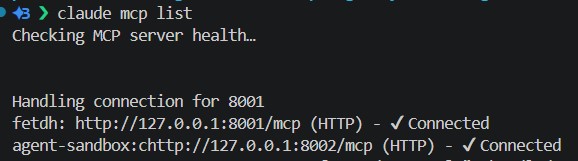
claude mcp list
The claude mcp list, should output the following results on your terminal:
Two caveats follow directly from how this POC is built. First, server.json advertises https://…svc.cluster.local… because the official schema describes remote servers as HTTPS URLs. Inside the cluster the Services speak plain HTTP, and the agent rewrites that. A CLI on a laptop must rewrite too — that is what the port-forwards are. Second, this registry enables anonymous publish (/v0.1/auth/none) for the io.modelcontextprotocol.anonymous/* namespace. That is acceptable on a ClusterIP in kind. It is not acceptable on a public Ingress. If you expose the catalog, turn anonymous auth off and put OIDC or a gateway in front; if you expose the MCP servers, put auth on those too. Registry credentials never substitute for MCP-server credentials.
The Registry Landscape
Several products now call themselves an “agent registry” or “MCP registry”. They are not interchangeable. Some are governed enterprise catalogs. Some are public package indexes. Some are client libraries. This section names some of them.
AWS Agent Registry
AWS Agent Registry is a private catalog inside Amazon Bedrock AgentCore. It indexes agents, tools, skills, and MCP servers across an organization, including workloads that do not run on AWS. Teams register records in the console or API, or point the registry at a live MCP/A2A endpoint and let it pull schemas. Access is IAM or OAuth (custom JWT). The registry is also exposed as an MCP server, so an IDE agent can query the catalog with the same protocol it uses to call tools. That is a governance product: identity, ownership, and an approved inventory. It is the right shape if the rest of the platform already lives in AgentCore. It is the wrong shape for a kind cluster that should stay vendor-neutral and local.
Google Cloud Agent Registry
Google Cloud Agent Registry is Google’s inventory of MCP servers, tools, skills, and agents inside a Cloud project. Administrators curate what developers may bind; Agent Development Kit clients list McpServer resources and connect to approved endpoints. Closely related is Cloud API Registry in Vertex AI Agent Builder, which turns Google services and Apigee-managed APIs into MCP tools. Google’s language is tool governance more than a universal cross-cloud agent index. Like AWS, it assumes cloud identity and a hosted control plane. We would be importing a SaaS catalog into a POC whose MCP servers are ClusterIP processes.
Cloudflare MCP catalog and portals
Cloudflare’s contribution is split. There is a catalog of Cloudflare-operated remote MCP servers (Workers, observability, and product APIs) that clients connect to with OAuth. Separately, MCP server portals (Access / Zero Trust) multiplex several MCP backends onto one HTTP endpoint with policy. Cloudflare also hosts remote MCP servers on Workers. That is an edge runtime and an access layer, not a server.json registry we can deploy next to postgres in kind. Useful if the goal is public remote MCP with OAuth; orthogonal if the goal is an in-cluster catalog of our own servers.
Official MCP Registry (modelcontextprotocol/registry)
The official MCP Registry is the open catalog and REST API behind registry.modelcontextprotocol.io. It stores server.json metadata — name, version, packages or remotes — and exposes /v0.1/servers for discovery and /v0.1/publish for publication. Publishers on the public instance prove namespace ownership with GitHub OAuth, GitHub OIDC, or DNS. The project also publishes the OpenAPI spec so other registries can look the same to clients.
LangChain MCP adapters
There is no LangChain registry product analogous to AWS or Google. What LangChain ships is langchain-mcp-adapters: a client that turns MCP tools into LangChain tools. That is the library this agent uses. It does not replace a registry; it consumes whatever connections you give it — including connections you just fetched from modelcontextprotocol/registry.
Why We Chose the Official Registry
We needed a catalog that:
- Speaks the same
server.jsonour servers already write. - Has a list/publish HTTP API a 40-line Python Job can call.
- Does not require AWS, GCP, or Cloudflare accounts in the inner loop.
- Fits next to the existing postgres Deployment.
ghcr.io/modelcontextprotocol/registry:latest matches that list. Our servers are named io.modelcontextprotocol.anonymous/fetch and io.modelcontextprotocol.anonymous/agent-sandbox, they are not on the public internet, and this kind cluster has no OIDC issuer. Self-hosting the image lets us turn on anonymous auth for that namespace, disable registry-side schema validation that would reject in-cluster URLs, and keep the Service as ClusterIP.
That last point is a security requirement, not a convenience. Anonymous publish plus a hardcoded JWT seed plus validation off is a laboratory configuration. The registry must not have a public endpoint. Only in-cluster DNS (http://mcp-registry:8080) is in the manifests. If you need Claude on a laptop, port-forward as shown above; do not Ingress this Service as-is.
Running the Registry In-Cluster
The stack overlay is where the new pieces land. kustomize/stack/kustomization.yaml still pulls postgres, chroma, the warm pool, and the Chainlit app. It now also pulls the registry, the register Job, and the two MCP servers:
resources:
  - namespace.yaml
  - ../base
  - ../mcp-register
  - ../mcp-registry
  - ../mcp-fetch
  - ../agent-sandbox-mcp
  - ../sandbox
  - ../app
Postgres gained a second database. The app continues to use langgraph for checkpoints; the registry gets mcp_registry from kustomize/base/postgres-initdb.yaml, mounted into the postgres image’s docker-entrypoint-initdb.d:
data:
  02-mcp-registry.sql: |
    CREATE DATABASE mcp_registry;
The registry Deployment is kustomize/mcp-registry/deployment.yaml. An init container waits until pg_isready succeeds against that database. The container env is the entire operational contract:
env:
  - name: MCP_REGISTRY_SERVER_ADDRESS
    value: ":8080"
  - name: MCP_REGISTRY_DATABASE_URL
    value: postgres://langgraph:langgraph@postgres:5432/mcp_registry?sslmode=disable
  - name: MCP_REGISTRY_ENABLE_ANONYMOUS_AUTH
    value: "true"
  - name: MCP_REGISTRY_JWT_PRIVATE_KEY
    value: "8103179d8ef955f6d3de6d6217224a909ec4060529dfeb1d4ca5a994537658cd"
  - name: MCP_REGISTRY_SEED_FROM
    value: ""
  - name: MCP_REGISTRY_ENABLE_REGISTRY_VALIDATION
    value: "false"
  - name: MCP_REGISTRY_OIDC_ENABLED
value: "false"| Variable | Role in this POC |
|---|---|
MCP_REGISTRY_SERVER_ADDRESS | Listen address inside the pod. |
MCP_REGISTRY_DATABASE_URL | Dedicated postgres database; not the LangGraph checkpoint DB. |
MCP_REGISTRY_ENABLE_ANONYMOUS_AUTH | Allows POST /v0.1/auth/none so the Job can publish io.modelcontextprotocol.anonymous/* servers without GitHub or DNS. |
MCP_REGISTRY_JWT_PRIVATE_KEY | Ed25519 seed that signs registry tokens. Hardcoded and POC-only. |
MCP_REGISTRY_SEED_FROM | Empty: the catalog starts blank; servers register themselves. |
MCP_REGISTRY_ENABLE_REGISTRY_VALIDATION | Off, because official validation expects publicly reachable HTTPS remotes. Our remotes are in-cluster. Core field limits (for example description ≤ 100 characters) still apply on /v0.1/publish. |
MCP_REGISTRY_OIDC_ENABLED | Off. There is no identity provider in our POC. |
The app does not embed registry logic beyond a URL. kustomize/app/deployment.yaml sets:
- name: MCP_REGISTRY_URL
  value: http://mcp-registry:8080
src/env_setup.py reads the same variable with that default. That is the only registry setting the agent needs.
How MCP Servers Get Registered
A registry with a publish API can be filled in several ways. They differ by when you publish and who holds credentials.
- Human or CI with the official publisher. On the public registry you run
mcp-publisher, complete GitHub OAuth or DNS verification, and POST aserver.json. That is the documented path for open servers. It assumes a public remote or a public package. - Seed file at process start. The official image can load an initial catalog from
MCP_REGISTRY_SEED_FROM. Useful for a frozen allow-list. Awkward when servers come and go with Deployments. - Self-registration in the server process. A
postStarthook or the server’s own startup POSTsserver.jsononce/readyzsucceeds. The server is the source of truth, but a slow or down registry becomes the server’s startup failure, and Kubernetes will restart a healthy MCP process because the hook failed. - A sidecar or init container. Same POST, isolated from the server binary. Init containers still block Ready; sidecars need a policy for retries without killing the main container.
- A Kubernetes Job (or CronJob) that waits on both sides. The Job is a third object: it does not own the MCP pods and does not own the registry. It waits for registry health and each server’s readiness endpoint, then publishes. Failures retry the Job, not the servers. This is the usual pattern when registration is “converge the catalog after the data plane is up”.
- GitOps apply of records. A controller watches
server.jsonConfigMaps and reconciles them to the registry. More moving parts than a POC needs; the right production evolution of (5).
Auth is independent of the delivery mechanism. Public official: GitHub / OIDC / DNS. Cloud registries: IAM. Self-hosted official image: JWT, optional OIDC, optional anonymous for the reserved namespace.
How this code-base registers, and why
We chose (5). kustomize/mcp-register/job.yaml is a batch Job, not a hook on the MCP Deployments:
apiVersion: batch/v1
kind: Job
metadata:
  name: mcp-register
  labels:
    app: mcp-register
spec:
  ttlSecondsAfterFinished: 120
  backoffLimit: 12
The Job container reuses the fetch MCP image (it already has Python) and runs a tiny driver that publishes every mounted */server.json. Adding a third MCP server is a new volume mount (plus a readiness URL). The LangGraph app does not read this list — it GETs /v0.1/servers on every specialist turn (kustomize/mcp-register/job.yaml):
roots = sorted(pathlib.Path("/config").glob("*/server.json"))
if not roots:
    raise SystemExit("no /config/*/server.json mounted")
for path in roots:
    env["MCP_SERVER_JSON"] = str(path)
    env["MCP_WAIT_LOCAL"] = ready_by_dir.get(
        path.parent.name, f"http://{path.parent.name}:8000/readyz"
    )
The actual publisher is kustomize/mcp-register/register.py. It is stdlib-only (urllib) so the same file could run as a postStart hook inside either MCP image if we ever wanted that. The sequence is:
- Wait for
GET {registry}/v0.1/health. - Wait for the target server’s readiness URL.
POST /v0/auth/none(falls back to/v0.1/auth/none) and read a bearer token.POST /v0.1/publish(falls back to/v0/publish) with theserver.jsonbody.- Treat HTTP 409 / “already exists” as success so reruns are idempotent.
Turning MCP_REGISTRY_ENABLE_REGISTRY_VALIDATION off only skips the “public HTTPS remote” checks. Core field limits still apply. description must be 100 characters or fewer; a longer string returns HTTP 422, the Job retries, and /v0.1/servers stays empty. That is why the fetch record’s description is the short @modelcontextprotocol/server-fetch line, not a full package blurb (kustomize/mcp-fetch/server.json).
def main() -> int:
    registry = _env("MCP_REGISTRY_URL", "http://mcp-registry:8080").rstrip("/")
    server_json_path = _env("MCP_SERVER_JSON", "/config/server.json")
    local_ready = _env("MCP_WAIT_LOCAL", "http://127.0.0.1:8000/readyz")

    _wait_http(f"{registry}/v0.1/health", attempts=60, delay=2.0)
    if local_ready:
        _wait_http(local_ready, attempts=60, delay=2.0)

    with open(server_json_path, encoding="utf-8") as fh:
        server = json.load(fh)

    status, token_body = _first_ok(
        [f"{registry}/v0/auth/none", f"{registry}/v0.1/auth/none"],
        "POST", {}, None,
    )
    # ... extract token, POST server to /v0.1/publish ...
Kustomize feeds the script and the server.json files as ConfigMaps (mcp-register, mcp-fetch-server, agent-sandbox-mcp-server). The MCP Deployments mount their own server.json at /config for documentation and for any future hook; the Job mounts the same ConfigMaps at /config/fetch and /config/sandbox and publishes every */server.json it finds. One publish path, one record per mount, no custom operator. The agent never sees those paths.
langchain-mcp-adapters
langchain-mcp-adapters is the bridge between MCP and this graph. LangGraph specialists already bind LangChain tools. MCP servers expose tools over JSON-RPC. The adapter converts one into the other so a specialist bind_tools(...) call does not know or care whether fetch was written as a Python StructuredTool or advertised by a remote MCP process.
That matters more after the previous article than it sounds. The sandbox article’s code_interpreter was a LangChain tool that imported k8s-agent-sandbox. Replacing it with MCP without the adapter would have meant teaching every specialist node the MCP SDK. With the adapter, the graph still sees a list of LangChain tools. The transport, session, and protocol stay in src/tools/mcp_client.py.
LangChain’s MCP docs say MultiServerMCPClient is stateless by default: each tool invocation can open a fresh ClientSession, run, and clean up. That is fine for fetch. It is fatal for Agent Sandbox MCP, which labels Kubernetes claims with the session id, so create and execute must share a session. The same page documents the stateful path: async with client.session(name) then load_mcp_tools(session). The adapter is still the right library; StickyMCPSessions is that pattern held for a specialist turn.
MultiServerMCPClient
MultiServerMCPClient is the adapter’s multi-endpoint client. You construct it with a dict of named connections. Each value is either a stdio command or a URL plus transport (streamable_http or sse). get_tools() returns a merged list of LangChain tools from every server that answered.
A typical static setup looks like the upstream example:
from langchain_mcp_adapters.client import MultiServerMCPClient

client = MultiServerMCPClient(
    {
        "fetch": {
            "url": "http://mcp-fetch:8000/mcp",
            "transport": "streamable_http",
        },
        "agent-sandbox": {
            "url": "http://agent-sandbox-mcp:8000/mcp",
            "transport": "streamable_http",
        },
    }
)
tools = await client.get_tools()
We do not hard-code that dict in the graph. make_multiserver_client builds it from live registry fetchers so adding a third MCP server is a publish, not a code change:
def make_multiserver_client(*fetchers: Fetcher):
    """Build a MultiServerMCPClient from live registry (or extra) fetchers."""
    from langchain_mcp_adapters.client import MultiServerMCPClient

    connections: dict[str, dict[str, Any]] = {}
    used = fetchers or (fetch_registry_servers,)
    for fn in used:
        try:
            connections.update(fn() or {})
        except Exception as exc:
            _logger.warning("MCP server fetcher %s failed: %s", getattr(fn, "__name__", fn), exc)
    return MultiServerMCPClient(connections)
fetch_registry_servers() is the only fetcher in production. Tests inject fakes. The client is created per specialist turn, from a fresh registry snapshot, which is how a Job that finished after the app started still becomes visible without restarting Chainlit.
Adding Fetch MCP (mcp-server-fetch)
The previous articles implemented web_search as an in-process DuckDuckGo wrapper in the app image. That coupled scraping to the UI Deployment. This article does not replace it with another search engine. It uses the official Fetch MCP server — PyPI mcp-server-fetch, registry name io.github.modelcontextprotocol/server-fetch / @modelcontextprotocol/server-fetch — so the model constructs a URL and the server GETs that page as markdown.
Chrome DevTools MCP would give richer browsing, and it needs Chromium. Fetch is the official lightweight alternative: one tool advertised by the server’s own tools/list — the graph does not hard-code that name.
Streamable-HTTP
Upstream python -m mcp_server_fetch is stdio-only. This cluster’s clients speak streamable-HTTP, and kubelet needs /healthz /readyz. Same pattern as Agent Sandbox MCP: keep the official implementation, wrap the process.
kustomize/mcp-fetch/http_app.py lets official serve() register fetch (and the fetch prompt) on its low-level Server, then stops before stdin and mounts that Server at /mcp with StreamableHTTPSessionManager. kustomize/mcp-fetch/health_wrapper.py is probes only — /healthz and /readyz in front of that app.
# http_app.py — transport only; the tool is upstream serve()
mcp_app = streamable_http_app(official_fetch_server())

# health_wrapper.py
from http_app import mcp_app
app = _attach_probes(mcp_app)
Cluster shape and catalog record
kustomize/mcp-fetch/deployment.yaml is a one-replica Deployment plus a ClusterIP Service on port 8000 named mcp-fetch. kustomize/mcp-fetch/server.json is what the register Job publishes (anonymous namespace, because this copy is ClusterIP-only):
{
  "$schema": "https://static.modelcontextprotocol.io/schemas/2025-12-11/server.schema.json",
  "name": "io.modelcontextprotocol.anonymous/fetch",
  "title": "Fetch",
  "description": "Official @modelcontextprotocol/server-fetch over streamable HTTP.",
  "version": "1.0.0",
  "remotes": [
    {
      "type": "streamable-http",
      "url": "https://mcp-fetch.agentic-chain.svc.cluster.local:8000/mcp"
    }
  ]
}
After the Job succeeds, the next specialist turn GETs the catalog, opens a session to the fetch remote, and binds whatever tools/list returns (upstream, that is the fetch tool).
How the graph uses it
Research, finance, legal, and general specialists all have "mcp" in SPECIALIST_TOOL_KEYS. That placeholder is expanded at invoke time: StickyMCPSessions re-lists the registry, tags each LangChain tool with the catalog server it came from (metadata["mcp_server"], metadata["mcp_kind"]), and _bind_specialist_tools binds the live list. Non-code turns get every MCP tool plus any RAG tools. Prompts talk about “a live-page MCP tool from the bound registry tools”, then append format_discovered_mcp_tools(...) so the model sees the actual names and one-line descriptions from tools/list. Routing policy stayed in the graph; reading the live web became an official MCP server the catalog can gain or lose without a new app image.
Adding Agent Sandbox MCP
Code execution stays on the same gVisor warm pool as the previous article. What changes is the caller. The app no longer claims SandboxWarmPool objects. The official Agent Sandbox MCP server does, in-cluster. Specialists bind whatever that remote’s tools/list returns. That matches how upstream itself is meant to be consumed.
Building the image
There is no pre-built “with probes” image that matches this POC, so the Makefile does two builds. make docker-build-sandbox-mcp downloads kubernetes-sigs/agent-sandbox tag v0.5.4, builds clients/integrations/mcp-server as k8s-agent-sandbox-mcp-upstream:v0.5.4, then wraps it with kustomize/agent-sandbox-mcp/Dockerfile:
FROM k8s-agent-sandbox-mcp-upstream:v0.5.4

USER root
COPY health_wrapper.py placement.py /app/
RUN chown appuser:appuser /app/health_wrapper.py /app/placement.py
USER appuser

ENTRYPOINT ["uvicorn", "health_wrapper:app", "--host", "0.0.0.0", "--port", "8000"]
Two files, two jobs:
health_wrapper.pyis the process entry: kubelet probes plusinstall_placement_defaults(mcp)./readyzloads in-cluster Kubernetes config and calls the API server, so the Deployment is not Ready until the MCP process can actually claim sandboxes.placement.pyowns cluster defaults. Official tools still requirewarmpool/namespacewith no server defaults. The module does not enumerate tool names. It inspects each advertised JSON schema: if a property isnamespace,warmpool, orshutdown_after_seconds, omitted args are filled from this pod’s env andtools/listmarks them optional.get_sandbox_configis how any MCP client queries the values.
def get_sandbox_config() -> dict[str, Any]:
    return sandbox_defaults()

def apply_sandbox_defaults(args: dict | None, schema: dict | None = None) -> dict:
    """Fill blank placement args that this tool's schema actually accepts."""
    ...
Catalog record
kustomize/agent-sandbox-mcp/server.json is the published identity:
{
  "$schema": "https://static.modelcontextprotocol.io/schemas/2025-12-11/server.schema.json",
  "name": "io.modelcontextprotocol.anonymous/agent-sandbox",
  "title": "Agent Sandbox",
  "description": "Official Agent Sandbox MCP (gVisor warm-pool code execution).",
  "version": "1.0.0",
  "remotes": [
    {
      "type": "streamable-http",
      "url": "https://agent-sandbox-mcp.agentic-chain.svc.cluster.local:8000/mcp"
    }
  ]
}
The register Job publishes server.json file the same way it publishes fetch.
How the graph uses it
On a code-related subtask the specialist is bound only to tools tagged sandbox-mcp from the published catalog key (classify_mcp_kind looks for sandbox in the registry name). RAG and fetch-style tools are withheld so the model cannot skip execution.
The Registry-Backed MCP Client
src/tools/mcp_client.py is the entire MCP integration on the agent side. MCP tools are loaded per call from the live catalog, tagged with the server that advertised them.
Listing remotes
fetch_registry_servers() tries /v0.1/servers?version=latest, then /v0.1/servers, then /v0/servers, so a slightly older registry image still works. Each remote URL is rewritten from advertised HTTPS cluster DNS to in-cluster HTTP (src/tools/mcp_client.py):
def _incluster_http(url: str) -> str:
    """Registry remotes must be https://; in-cluster MCP servers speak HTTP."""
    if url.startswith("https://") and ".svc.cluster.local" in url:
        return "http://" + url[len("https://") :]
    return url
That single function is why server.json can stay schema-shaped while kind Services stay unencrypted.
Sticky sessions
The graph never calls client.get_tools(). That helper lists tools by opening ephemeral sessions; later tool.invoke opens another. load_mcp_tools(session) is different: it reads tools/list from a session you already hold. StickyMCPSessions is a context manager that:
- Starts a dedicated asyncio loop on a worker thread (Chainlit already has a running loop).
- Builds a client from the current registry snapshot.
- Opens one
client.session(name)per catalog remote and loads tools from that session, tagging each tool with the server key so the binder can tell sandbox from fetch without a name allow-list. - Holds the sessions open until
__exit__. - Runs
tool.ainvokeon that same loop so create and execute share a session id, thenflatten_mcp_resultunwraps LangChain content blocks to the inner tool text (src/tools/mcp_client.py):
class StickyMCPSessions:
    """One streamable-HTTP MCP session per registry server, held for a specialist turn."""

    async def _hold(self) -> None:
        from langchain_mcp_adapters.tools import load_mcp_tools as load_from_session

        client = make_multiserver_client(*self._fetchers)
        async with AsyncExitStack() as stack:
            loaded: list[Any] = []
            for name in list(client.connections):
                try:
                    session = await stack.enter_async_context(client.session(name))
                    session_tools = await load_from_session(session)
                    loaded.extend(tag_mcp_tools(session_tools or [], name))
                except Exception as exc:
                    _logger.warning("sticky session for %s failed: %s", name, exc)
            self.tools = loaded
            _logger.info(
                "sticky MCP tools from registry: %s",
                [getattr(t, "name", "") for t in loaded] or "(none)",
            )
            self._ready.set()
            await self._loop.run_in_executor(None, self._closed.wait)

    def invoke(self, tool: Any, args: dict) -> str:
        fut = asyncio.run_coroutine_threadsafe(tool.ainvoke(args), self._loop)
        result = fut.result(timeout=int(os.getenv("SANDBOX_EXEC_TIMEOUT", "180")))
        return flatten_mcp_result(result)
specialist_node wraps the whole tool-calling loop in with StickyMCPSessions() as runtime.
Filtering
Each tool loaded from a sticky session is tagged with the registry server it came from. classify_mcp_kind uses the catalog key only. _tool_source reads that metadata, so a third published server shows up in Chainlit as its catalog key.
Enforcing Code Execution Through MCP
The graph file is still src/graph.py: planner → specialist(s) → aggregator → synthesizer → critic. What changed is how a specialist is allowed to answer a code question.
Prompts and tool keys
_MCP_DISCOVERY_POLICY is on every specialist: the bound registry list is authoritative, there is no in-process web_search or code_interpreter, and a fetch-style tool is given a full URL (the server does not search or rewrite paths). _SANDBOX_MCP_POLICY says to execute only through bound sandbox tools, follow the advertised schemas (create, write or upload relative to /app, run, report stdout/stderr/exit code), and never invent results.
specialist_node prepends current_date_instruction() so the system message opens with today’s calendar date, then appends format_discovered_mcp_tools(...) so the actual names and one-line descriptions from this turn’s inventory sit under that. On a code turn that inventory is sandbox-only. The critic prompt gets the same date line so it does not treat a current-year source as future or invented.
def current_date_instruction() -> str:
    """Fresh calendar date for LLM instructions (not a training-cutoff year)."""
    now = datetime.now().astimezone()
    return (
        f"Today's date is {now.strftime('%A, %d %B %Y')} "
        f"({now.date().isoformat()}). "
        ...
    )
Code Execution
src/nodes.py detects code-shaped tasks with _CODE_EXEC_REQUEST (execute/run/write Python, fenced blocks, print(). The planner is told to emit exactly one general subtask for those requests. _clamp_code_plan collapses accidental fan-out so overlapping “run the script” specialists cannot race the warm pool.
_bind_specialist_tools is the hard gate:
if needs_code:
    allowed = filter_sandbox_mcp_tools(mcp_tools)
    tools = allowed
else:
    tools = list(static.values()) + list(mcp_tools)
On a code turn the extra human message forbids a local interpreter, and to report only tool output. After each call, looks_like_exec_result is the “did it run?” check: flatten the MCP envelope, require stdout and exit_code, and reject a write/upload that echoes the source (a > file redirect, or a long indented listing) even when exit_code is 0.
def looks_like_exec_result(result: str) -> bool:
    """True when a bound tool returned command output, not a file-write dump."""
    text = flatten_mcp_result(result)
    fields = exec_result_fields(text)
    ...
    stdout = fields["stdout"] if fields else text
    return not _stdout_is_source_listing(stdout)
The tool loop keeps going until a bound tool returns the program's stdout. If none ran, the node injects a corrective turn and retries. The last real exec payload replaces specialist prose with _verbatim_code_specialist_output. The synthesizer returns that block as the final answer when the task was code-shaped. The critic’s _has_sandbox_evidence uses the same result shape (or the verbatim marker): missing evidence fails the draft; present evidence stops a style-only replan. Current-events drafts are judged against current_date_instruction(), not the model’s training cutoff.
Together: the registry discovers the servers, sticky sessions keep the sandbox claim, the binder keeps only sandbox-tagged tools on code turns, and the critic refuses invented numbers. That is the same safety goal as the previous article, expressed as MCP tool policy instead of an in-process SDK.
Conclusion
The agentic chain did not need a new planner. It needed a tool layer other agents can see. MCP gives each capability a remote schema; a registry gives those remotes a single list API; langchain-mcp-adapters turns that list into the LangChain tools the specialists already know how to bind.
This code-base runs the official modelcontextprotocol/registry image next to postgres, keeps it ClusterIP-only because anonymous publish is on, and fills the catalog with a Kubernetes Job after both MCP servers are Ready — not with a postStart hook that would punish a healthy sandbox process for a slow catalog. Web access moved into official Fetch MCP (mcp-server-fetch / @modelcontextprotocol/server-fetch), wrapped only so it speaks streamable-HTTP and kubelet can probe it. The graph’s job is now policy plus discovery: re-list the registry every turn, tag tools with the server that advertised them, bind sandbox-capability tools only on code tasks, keep sticky sessions.
What you get in kind is the same chat UI on port 30080, with a catalog at http://mcp-registry:8080 that a second client can query the same way this one does. That is the step from “we wrote some tools” to “we publish tools”.