The AI-powered Agentic Chain: Multi-Agent Workflows with LangGraph and LLMs
Prologue
By 2026, the limitations of linear LLM chains and basic ReAct-style agents have become painfully clear in production environments. Simple sequential prompting struggles with tasks that demand true parallelism, dynamic routing, self-correction, and long-running statefulness. Modern AI systems must plan, delegate across specialized roles, execute tools or retrieval in parallel, synthesize conflicting information, critique their own outputs, and resume gracefully after interruptions or failures. This is the essence of agentic AI — systems that behave less like clever chatbots and more like reliable digital teams.
In this article we walk through a practical implementation of a sophisticated agentic chain that brings all of these primitives together in one coherent system. Our architecture features a planner that decomposes tasks and decides which specialists are needed, a router that uses Send to spin up parallel specialist branches (each with its own tools and RAG capabilities), an aggregator + synthesizer stage, and a critic node that can loop the entire flow back for refinement — up to a safe iteration limit — before producing a final grounded answer.
Everything is powered by ChatGPT (or any OpenAI-compatible model) with structured outputs for reliability, fully checkpointed with PostgresSaver for production resilience, and observable through custom event hooks. The accompanying code in the code/src/ directory of this post is ready to run (via Docker Compose) and serves as a real-world reference you can study, extend, or deploy directly.
Whether you are building internal automation platforms, customer-facing research agents, or complex multi-step workflows, the patterns shown here represent the current best-practice approach to agentic systems in 2026. Let’s dive in.
Prerequisites
Before diving into the agentic chain implementation, make sure your development environment meets the following requirements. This setup has been designed to be as frictionless as possible while remaining fully production-oriented.
Required Tools
Python 3.14.4 or higher
Download Python
Python is the primary language for the entire stack. The project uses modern type hints,TypedDictwith reducers, and the latest LangGraph features that require Python 3.14+.pip (comes bundled with Python)
We use it to install the Python dependencies listed insrc/requirements.txt(LangGraph, LangChain, OpenAI, Chroma, psycopg, LangSmith, etc.).Docker Compose (v2+)
Install Docker Desktop (recommended)
Docker Compose spins up the two supporting services the agentic chain depends on:- PostgreSQL 16 — used by
PostgresSaverfor graph checkpointing, persistence, and resumability across runs or crashes. - Chroma — the vector database that powers the RAG tools available to the specialist agents.
- PostgreSQL 16 — used by
Clone the Repository
Clone this site’s source repository and enter the code directory for this post:
git clone https://github.com/BrutalHex/tech-articles && \
cd tech-articles/docs/posts/2026-06-22-agentic-chain/code
All following steps in this section assume your shell is already in that code/ directory.
Creating the .env File
Note on Costs
Running the agentic chain involves real API calls to your configured LLM provider. This will incur costs depending on the model used and the number of tokens processed. Please use the code responsibly and monitor your API usage, especially during development and testing.
All sensitive configuration and service connection strings live in a .env file placed directly inside the code/ folder (next to docker-compose.yml).
- In the
code/directory, create a new file named.env. - Copy the template below and replace the placeholder values with your own credentials.
OPENAI_API_KEY=sk-proj-*
LANGSMITH_API_KEY=lsv2_pt_*
LANGSMITH_PROJECT="langgraph-project"
ENABLE_LANGSMITH_TRACING=true
LANGSMITH_ENDPOINT=https://eu.api.smith.langchain.com
CHECKPOINTS_DB_URI="postgresql://langgraph:langgraph@localhost:5432/langgraph"
CHROMA_HOST="localhost"
CHROMA_PORT="8000"
How to obtain the required tokens
OPENAI_API_KEY
Go to OpenAI Platform → sign in (or create an account) → click Create new secret key.
Copy the key starting withsk-proj-.
Note: You will need a paid OpenAI account with billing enabled to use GPT-4o or newer models.LANGSMITH_API_KEY (highly recommended)
Visit LangSmith (use the EU region if you prefereu.api.smith.langchain.com).
Create a free account → go to Settings → API Keys → create a new Personal Access Token.
LangSmith provides excellent tracing, debugging, and evaluation capabilities that integrate natively with LangGraph. SettingENABLE_LANGSMITH_TRACING=truegives you beautiful visualizations of every node execution, tool call, and state transition.Database & Chroma credentials
These are pre-configured to work with thedocker-compose.ymlfile in the same folder.
Once you start the containers (docker compose up -d), PostgreSQL and Chroma will be available at the exact URIs shown above. No manual database setup is required.
After saving the .env file, you can start the infrastructure services with:
cd ./docs/posts/2026-06-22-agentic-chain/code/ && \
docker compose up -d
Then install Python dependencies:
cd ./src/ && \
python3 -m venv .venv && \
source .venv/bin/activate && \
pip install --upgrade pip && \
pip install -r requirements.txt
Hands-On: Run Your First Agentic Task
Now that your environment is ready, let’s get the system running with real data and see the agentic chain in action. The specialist agents in this workflow rely heavily on Retrieval-Augmented Generation (RAG). They use tools that query a Chroma vector database containing domain-specific knowledge. Before running any meaningful task, you must populate this database with seed data.
1. Seed the Chroma Vector Database
From inside the src/ directory, run:
python3 seed_chroma.pyThis script loads curated dummy documents (financial reports, product data, quarterly metrics, etc.) into Chroma. The specialists will later retrieve relevant chunks when answering questions that require factual grounding.
2. Execute Your First Agentic Task
With the knowledge base populated, launch the agentic chain:
python3 main.py -t "get me the revenue growth for AI products in second quarter of 2025" --thread my-sessionWhat the flags do:
-t/--task: The user query you want the agentic system to solve.--thread: A unique session identifier. LangGraph uses this to load previous checkpoints from PostgreSQL, enabling memory and resumability across multiple interactions in the same conversation.
You can now ask follow-up questions in the same session by simply typing new tasks (the interactive loop keeps the thread alive).
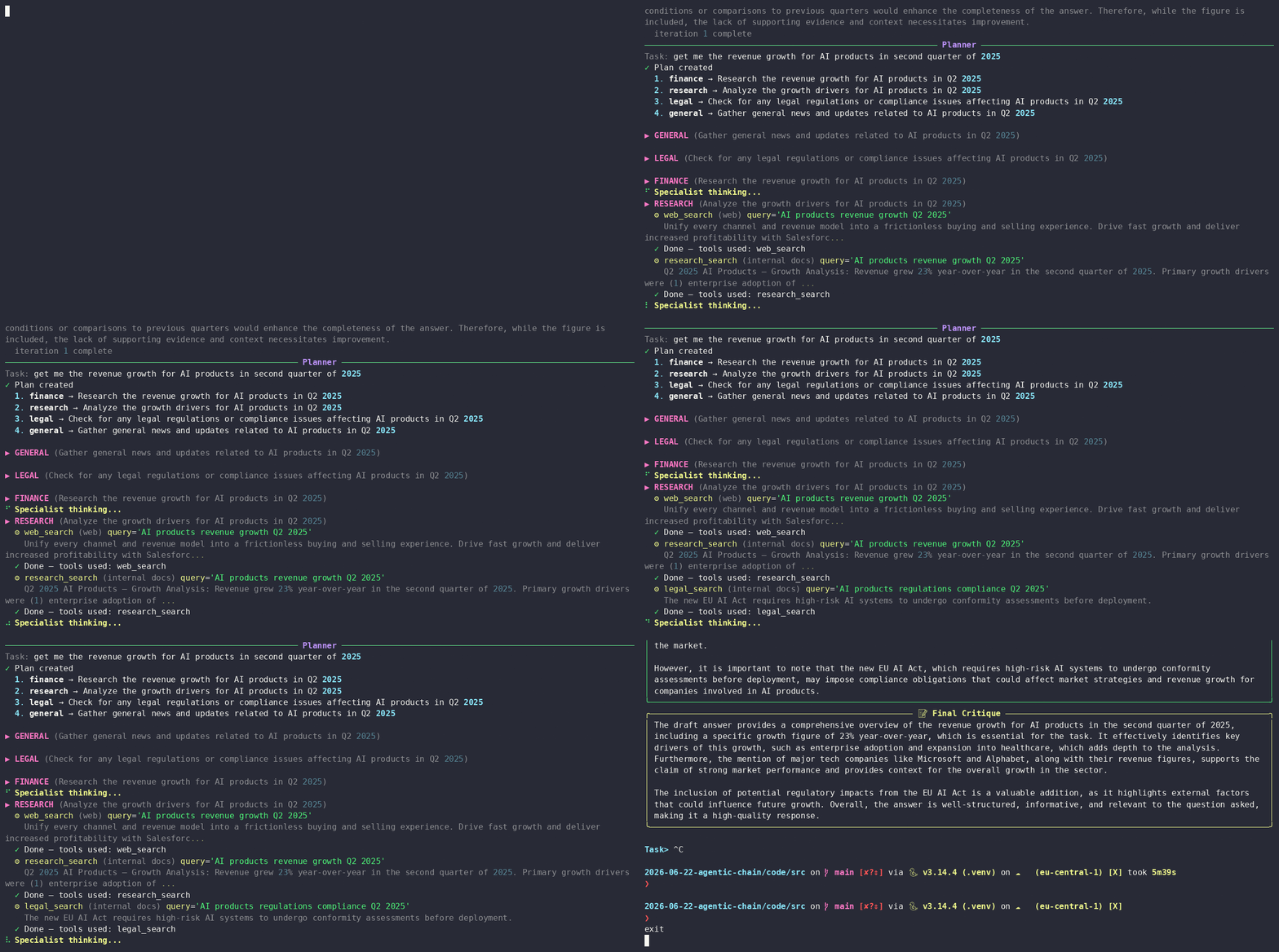
Here’s what a successful result looks like:
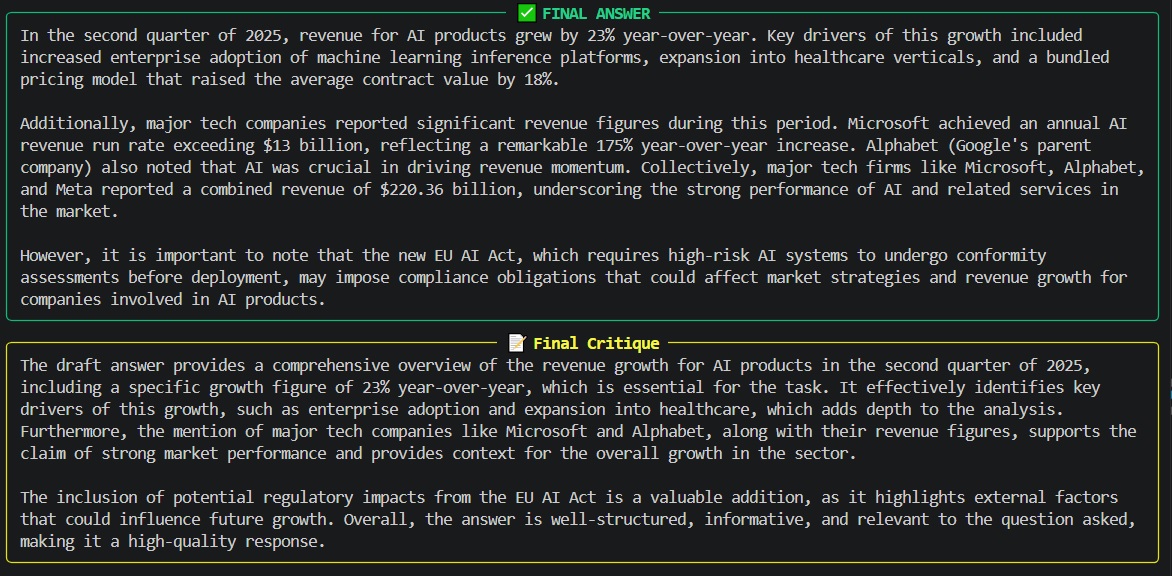
What actually happens under the hood:
- The planner decomposes the request and identifies required specialists.
- The router uses LangGraph’s
SendAPI to fan out work in parallel. - Specialists retrieve information from Chroma using RAG tools.
- Results are aggregated and synthesized.
- The critic evaluates the output and decides whether another iteration is needed.
This single command already exercises almost every major LangGraph primitive we will explore in depth later in the article: conditional edges, dynamic parallel execution via Send, state reducers, cycles for reflection, and persistent checkpointing.
The Agentic Workflow: From Task to Verified Answer
Understanding how a task moves through the system is essential before we examine the individual components. The diagram below illustrates the complete lifecycle of a request inside the agentic chain.
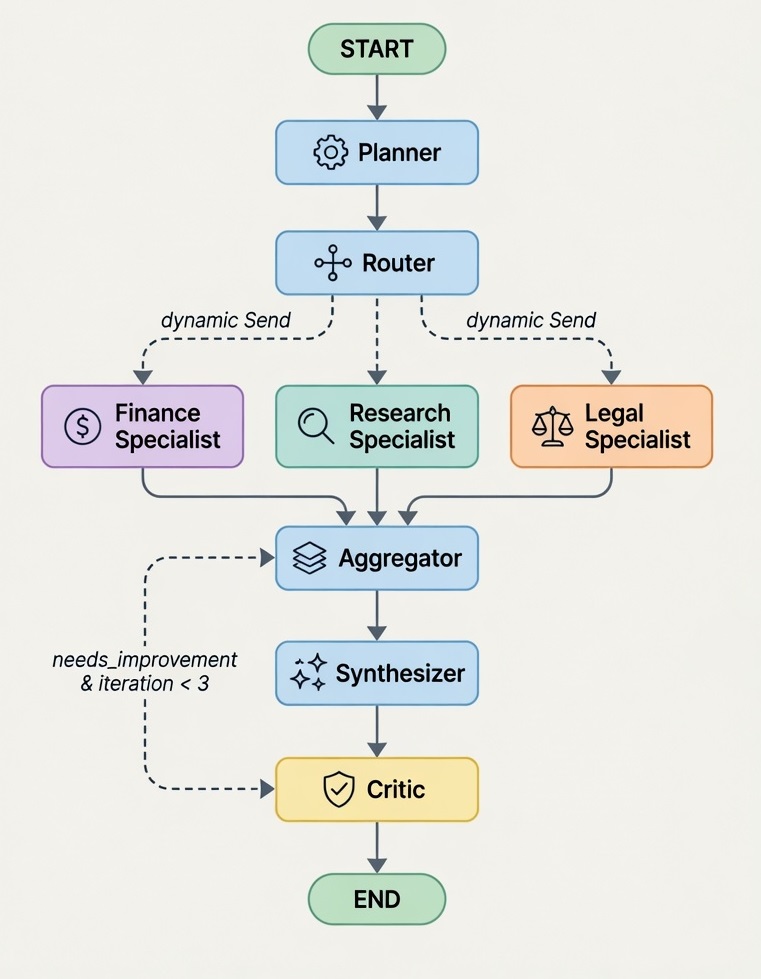
Note: The specialist names (Finance, Research, Legal) shown above are illustrative. In the actual implementation the planner dynamically decides which specialists are required for the given task. The graph itself does not contain hardcoded specialist nodes — parallelism is achieved at runtime using LangGraph’s
SendAPI.
Step-by-Step Execution Flow
Here is exactly how the system behaves when you submit a task (aligned with the code in graph.py, nodes.py, and state.py):
START → Planner
The workflow begins at theplanner_node. It receives the user task and (on subsequent iterations) any critique from the previous round. Using structured output, the planner produces a high-level plan and a list ofspecialists_needed.Planner → Router
Therouter_nodereceives the plan and the list of required specialists. It aligns them (padding with a"general"specialist if needed) and returns a list ofSendobjects. This is the key moment where dynamic parallelism is triggered.Parallel Specialist Execution (via
Send)
LangGraph spawns as many concurrentspecialist_nodeinstances as there are items in theSendlist. Each specialist:- Receives its own
specialist_typeandsubtask - Loads its dedicated LLM + tools (including RAG tools backed by Chroma)
- Runs tool-calling loops (up to
MAX_TOOL_ROUNDS) - Returns its result under the
specialist_resultskey
Because
specialist_resultsis declared asAnnotated[List[Dict], operator.add], results from all parallel branches are automatically merged into a single list.- Receives its own
Aggregator
Theaggregator_nodefilters the accumulatedspecialist_resultsto keep only those belonging to the currentquery_idanditeration. It then formats everything into clean markdown sections stored incombined_results.Synthesizer
Thesynthesizer_nodetakes the combined specialist outputs and asks the LLM to produce a single, coherent, fact-grounded final answer (strictly based on the retrieved information).Critic (Reflection & Loop Decision)
Thecritic_nodeuses structured output to evaluate the synthesized answer. It returns:needs_improvement(boolean)critique(textual feedback)- Incremented
iterationcounter
Conditional Edge from Critic
Theshould_continuefunction (defined ingraph.py) checks:pythonif state.get("needs_improvement") and state.get("iteration", 0) < 3: return "planner" return END- If improvement is needed and we are under the safety limit of 3 iterations → the flow loops back to the Planner (carrying the critique).
- Otherwise the workflow ends and the final answer is returned to the user.
Why This Flow Matters
This design gives us several production-grade capabilities in one clean graph:
- Dynamic parallelism without manually managing threads or futures (thanks to
Send) - Controlled self-reflection via the critic loop (with a hard safety cap)
- Safe state merging across parallel branches using reducers
- Full observability and resumability because every step is automatically checkpointed to PostgreSQL
Constructing the Workflow
The complete agentic workflow is orchestrated in graph.py. This file serves as the architectural backbone of the system, where every major component — the planner, router, specialists, aggregator, synthesizer, and critic — is composed into a single, coherent, and executable graph. Rather than relying on rigid sequential chains, the implementation leverages LangGraph's StateGraph to create a clear, visual, and highly maintainable structure. Each logical step in the process is defined as a node, while the relationships between them are expressed through edges, including both conditional routing and dynamic parallel execution.
Execution begins at the planner, which decomposes the incoming task and determines the appropriate specialists required. Control then flows to the router, which utilizes LangGraph’s powerful Send API to dynamically instantiate multiple specialist nodes that run in parallel. Once their individual contributions are complete, results converge at the aggregator before moving to the synthesizer, which crafts a unified and grounded final response. The critic subsequently assesses this output and determines whether further refinement is necessary. If improvement is required and the iteration threshold has not been exceeded, the workflow intelligently loops back to the planner — creating a controlled reflection cycle that allows the system to self-correct before producing its final answer.
What truly elevates this implementation is its robust use of persistent checkpointing. By integrating PostgresSaver, every intermediate state of the graph is automatically persisted to a PostgreSQL database. This design unlocks essential production capabilities, including the ability to resume interrupted executions, inspect historical runs, and maintain conversational memory across multiple interactions within the same thread. Because the graph cleanly separates node logic from flow control, developers can confidently extend, debug, or refactor individual components without disrupting the overall architecture of the agentic system.
Retrieval-Augmented Generation(RAG)
One of the most powerful capabilities of the specialist agents in this agentic chain is their ability to ground answers in internal knowledge using RAG. This functionality is implemented inside src/rag.py.
What rag.py Does
The rag.py module is responsible for creating domain-specific search tools that the specialist agents can call. Instead of giving every specialist access to the entire knowledge base, we create separate tools for different domains:
research_searchfinance_searchlegal_search
Each tool connects to its own Chroma collection (research_docs, finance_docs, legal_docs) and returns the most relevant document chunks when invoked.
This design keeps concerns separated and makes it trivial to add new domains later (e.g., HR, marketing, or engineering docs).
The Tools Defined in rag.py
The module exposes three StructuredTool instances created by the build_rag_tools() function:
| Tool Name | Chroma Collection | Purpose |
|---|---|---|
research_search | research_docs | Finds product performance, revenue growth, and segment data (especially useful for the example query about AI products in Q2 2025) |
finance_search | finance_docs | Retrieves financial metrics such as profit, earnings, margins, and quarterly results |
legal_search | legal_docs | Searches internal legal and compliance documents |
Each tool follows the same pattern:
- Takes a natural language
query - Retrieves the top 5 most relevant documents (
k=5) - Returns the concatenated
page_docsas a single string
Because these are proper LangChain StructuredTool objects with rich descriptions, the LLM agents can intelligently decide when and how to use them.
How the Tools Are Built (Key Code Patterns)
The module follows several clean architectural patterns:
get_vectorstore()— Encapsulates connection logic to the remote Chroma server.get_retriever()— Creates a LangChain retriever with consistentsearch_kwargs.make_collection_search_tool()— A factory function that turns any collection into a ready-to-use agent tool.build_rag_tools()— The main entry point that constructs all tools using a dictionary of collections and descriptions.
This factory-based approach makes the code highly reusable and easy to extend.
Best Practices Followed in rag.py
The implementation demonstrates several production-friendly practices:
- Separation of concerns — Vector store connection, retrieval logic, and tool interface are cleanly separated.
- Configuration over hardcoding — Collection names and tool metadata live in dictionaries, making extension trivial.
- Descriptive tool metadata — Every tool includes a detailed natural-language description that helps the LLM choose the right tool.
- Dependency injection — The embedding function, host, and port are passed in rather than imported globally.
- Consistent retrieval settings — Using a fixed
k=5avoids unpredictable result sizes. - Agent-friendly output — Tools return clean text that LLMs can easily reason over.
Alternative Vector Store Choices
While this project uses Chroma, LangChain supports many excellent vector databases. Here are the most common production choices:
| Vector Store | Best For | Link |
|---|---|---|
| Chroma | Local development & mid-scale self-hosted setups | trychroma.com |
| Pinecone | Fully managed serverless vector search at scale | pinecone.io |
| Weaviate | Open-source with strong hybrid search and modules | weaviate.io |
| Qdrant | High-performance Rust-based vector database | qdrant.tech |
| PGVector | When you already use PostgreSQL and want everything in one DB | pgvector |
| FAISS | Fast in-memory similarity search (great for prototyping or edge) | FAISS |
Why We Chose ChromaDB
We selected ChromaDB for this agentic chain implementation for several practical reasons:
- Excellent Docker support — It runs reliably as a lightweight container (as defined in our
docker-compose.yml), which aligns perfectly with the goal of a reproducible development and demo environment. - First-class LangChain integration — The
langchain-chromapackage provides a very clean and stable interface. - Client-server architecture — We can run Chroma as a separate service (on port 8000), which is more realistic for production than the embedded mode.
- Simplicity without sacrificing capability — Chroma offers good performance, filtering, and metadata support while remaining easy to operate and maintain.
- Cost-effective for this use case — For internal knowledge bases and specialist RAG tools, the operational overhead of managing a more complex cluster (Pinecone, Weaviate, etc.) is unnecessary.
Chroma strikes an excellent balance between developer experience and production readiness for the majority of agentic workflow use cases in 2026.
Specialists
At the heart of this agentic chain are the domain specialists — focused agents that handle specific types of work such as research, finance, or legal analysis. Rather than giving every specialist access to every tool, the system carefully assigns each one only the capabilities it needs. The file specialists.py defines both the personality and tool permissions for each specialist through carefully written system prompts and a mapping of allowed tool names. Meanwhile, rag.py is responsible for creating the actual retrieval tools that connect to different Chroma collections, allowing specialists to search internal documents in a structured way.
The connection between specialists and RAG happens in specialist_config.py. When the graph is initialized, the build_specialist_config function pulls in all the RAG tools generated by rag.py and merges them with other available tools. It then uses the permissions defined in specialists.py to give each specialist only the tools it is allowed to use, binding them directly to its own instance of the language model. This approach ensures that a finance specialist, for example, can search financial documents and run calculations, but cannot access legal or research collections. The result is a set of focused, reliable agents that ground their answers in retrieved information rather than hallucinating facts. This scoped access to RAG tools is one of the key reasons the system remains both powerful and predictable when handling complex, multi-domain queries.
Tools and How to Extend Specialist Capabilities
Beyond the powerful RAG capabilities provided by Chroma, the specialists in this agentic chain also have access to a set of general-purpose tools defined in tools.py. Currently, two tools are available:
- A web search tool powered by DuckDuckGo that allows specialists to fetch up-to-date information from the internet.
- A code interpreter that can safely execute Python code and return the results.
These tools are registered in a central TOOL_REGISTRY dictionary, which makes it easy for the configuration layer to assign the right tools to the right specialists. The web search tool is particularly useful when internal documents are not sufficient, while the code interpreter enables specialists to perform calculations, data analysis, or transformations directly when needed.
Adding new tools is straightforward and follows a consistent pattern used throughout the LangChain ecosystem. You simply define a new function, decorate it with LangChain’s @tool decorator, implement the desired logic, and then register it in the TOOL_REGISTRY. This approach keeps tool definitions clean and makes them automatically discoverable by the agent framework. Because the system already merges tools from tools.py with the RAG tools from rag.py inside specialist_config.py, any new tool you add becomes immediately available for assignment to specialists.
The LangChain framework offers a rich collection of ready-made tools that you can easily integrate. Some popular options include:
| Tool | Description | Link |
|---|---|---|
| Wikipedia | Search and retrieve docs from Wikipedia | LangChain Wikipedia Tool |
| Arxiv | Search academic papers on arXiv | LangChain Arxiv Tool |
| Tavily Search | High-quality web search optimized for AI agents | Tavily Search |
| YouTube Search | Search and transcribe YouTube videos | LangChain YouTube Tool |
| Requests | Make HTTP requests to any API | LangChain Requests Tool |
| SQL Database | Query relational databases using natural language | LangChain SQL Tool |
You can explore the full list of available tools in the official LangChain Tools Documentation. Adding any of these tools follows the same simple pattern already established in tools.py, allowing you to rapidly expand what your specialists can do without changing the core architecture of the agentic chain.
Configuring LLM and Embedding Models
All language model calls and vector embeddings in this agentic chain are configured through a dedicated module called openai_config.py. This file centralizes the creation of both the chat model and the embedding model, ensuring consistent settings, proper error handling, and easy customization across the entire system. Instead of scattering model initialization throughout the codebase, the project uses two factory functions — create_chat_llm() and create_embeddings() — that return properly configured LangChain objects ready to be used by planners, specialists, and the critic.
The chat model is powered by OpenAI’s gpt-4o-mini, chosen for its excellent balance of speed, cost, and reasoning capability. The embedding model used for RAG is text-embedding-3-small, which provides strong semantic quality at a very reasonable cost and dimension size. Both models share a common HTTP client configured with sensible timeouts and automatic retries, making the system more resilient when calling external APIs. Two particularly important parameters are set here: temperature is fixed at 0.2 to keep responses focused and deterministic rather than creative, which is generally preferred in agentic workflows where consistency and reliability matter more than randomness. The max_retries parameter is set to 3, allowing the system to gracefully recover from transient network issues or rate limits without failing the entire task.
While this project uses OpenAI models, the configuration is designed to be flexible. For embeddings, you could easily switch to stronger alternatives such as OpenAI’s own text-embedding-3-large, Voyage AI’s voyage-3, or Cohere’s embed-english-v3.0 depending on your accuracy and cost requirements.
For the chat model, popular options include OpenAI’s gpt-4o for higher intelligence, Anthropic’s Claude 3.5 Sonnet or Claude 4 for excellent reasoning, or even open-source models served through Groq, Fireworks AI, or Together AI. Because the creation functions accept **kwargs, swapping models or adjusting parameters like temperature and retry behavior can be done without modifying the core configuration file.
Conclusion
In this article, we explored how to move beyond simple prompt-response interactions and build a truly agentic system using LangGraph. By composing a planner, dynamic router, parallel specialists with RAG capabilities, aggregator, synthesizer, and a reflective critic into a single StateGraph, we created a workflow capable of decomposing complex tasks, executing work in parallel, grounding answers in retrieved knowledge, and iteratively improving its own outputs through controlled self-critique.
The patterns demonstrated here — dynamic parallelism via the Send API, structured reflection loops, scoped tool access, and robust state management — represent current best practices for building reliable multi-agent systems in 2026. While the example focuses on research and financial analysis, the same architectural principles apply to customer support agents, research assistants, automated reporting systems, and many other complex workflows.
The complete, runnable code is available in the code/ directory accompanying this post. We encourage you to experiment with it: modify the specialists, add new tools, change the underlying models, or extend the reflection logic. Agentic systems are still rapidly evolving, and the most valuable insights often come from hands-on exploration.
Thank you for reading. We hope this guide provides a practical and inspiring foundation for your own agentic AI projects.